


A media-box specification sheet can make RAM look like a simple performance score: more gigabytes must mean a faster box. There is some truth behind that idea, but it leaves out most of the story.
RAM affects how much active work a device can handle comfortably. It can help the launcher stay responsive, reduce unnecessary app reloads, and give system features more breathing room. It does not make a slow internet connection faster, add support for a missing video format, or turn a modest processor into a powerful one.
That distinction matters when several products all list 4GB of RAM but differ in price, storage, processor, ports, and network hardware. Here is how to read the number without expecting too much or dismissing it as meaningless.
RAM Is Working Space, Not File Storage
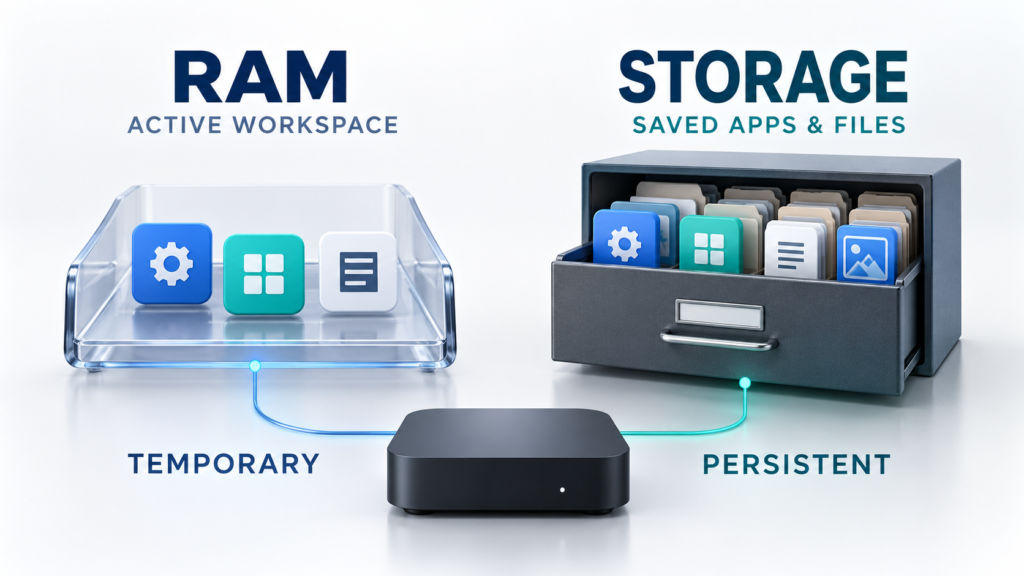
RAM, or random-access memory, is the device’s short-term working area. Android, the home-screen launcher, the app currently in use, background processes, graphics, and system services all use part of it. The contents change constantly as apps open, close, and move between the foreground and background.
Internal storage serves a different purpose. It holds the operating system, installed apps, updates, settings, caches, and user files even after the device is turned off. A box advertised with 4GB RAM and 64GB storage therefore has two separate resources: 4GB for active work and 64GB for persistent data.
The full advertised capacity is not sitting empty for one app to claim. The operating system and other essential processes already use some RAM, and hardware components may reserve a portion as well. That is normal.
What 4GB RAM Can Improve
Four gigabytes gives an Android-based media box room to keep more active code and data in memory than a lower-memory design. The difference is usually most noticeable in everyday navigation rather than in a single dramatic speed test.
Fewer unnecessary app reloads
Android often keeps recently used apps in RAM so they can reopen quickly. When memory pressure rises, the system starts reclaiming memory and may remove less important background processes first. Returning to one of those apps then requires a fresh load from storage.
With more available working space, a device may be able to retain more of its recent activity. That can make switching between the home screen, settings, and legitimate media apps feel less disruptive. App design and device software still influence the result, so 4GB should not be treated as a guarantee that every app will remain open.
More room for the launcher and system features
A television interface is doing more than displaying a row of icons. Artwork, menus, search, voice features, accessibility services, and background updates can all compete for memory. Google’s Android TV guidance notes that heavy memory pressure can slow apps and system services, delay a return to the launcher, and trigger process restarts.
Extra RAM provides useful headroom for that workload. Features such as split-screen or more elaborate launchers may also benefit, but only when the device software and apps actually support them. RAM capacity cannot create a feature that the manufacturer did not include.
A steadier experience under mixed use
Someone who opens one app and leaves it running asks less of memory than someone who frequently moves among apps, settings, file tools, and connected accessories. In the second situation, 4GB has more opportunity to show its value.
This is why RAM is best understood as capacity for active work. It can reduce one source of friction, especially when several processes are competing for space. It does not eliminate every possible slowdown.
What 4GB RAM Does Not Tell You
Two boxes with the same amount of RAM can behave quite differently. Several other components determine what the device can do and how quickly it responds.
It does not identify the processor or video decoder
The system-on-chip contains the CPU, GPU, and dedicated media capabilities. These parts handle interface calculations, graphics, and supported video formats. Android can use hardware-accelerated codecs for more efficient media processing, but the exact codec and resolution capabilities depend on the hardware.
Adding RAM does not add AV1, H.265, HDR, or a higher output resolution to a device that lacks the required support. Those features need to be verified separately on the product specification sheet.
It does not improve the network connection
RAM cannot correct weak Wi-Fi coverage, interference, an overloaded router, or a slow internet plan. For wireless performance, look at the supported Wi-Fi generation and bands, then consider the router, distance, walls, and congestion in the home. An Ethernet port may be valuable when a stable wired connection is practical.
If playback pauses while menus remain responsive, the network deserves investigation before RAM gets the blame.
It does not reveal storage speed or available capacity
RAM capacity and internal-storage capacity are separate specifications. Storage speed can affect app installation and loading, while storage capacity determines how much room exists for apps and data. The usable amount will also be lower than the advertised total after the operating system and preinstalled software take their share.
A larger storage number gives more room; it does not automatically prove that the storage itself is faster.
It cannot compensate for poor software or heat management
Firmware quality, app optimization, background activity, and thermal design all affect responsiveness. A well-integrated device can feel better than another box with a similar-looking specification list. Updates matter too, particularly when they correct stability or compatibility problems.
That is why buying solely by the largest number on the box is rarely a good strategy.
Why “Free RAM” May Look Surprisingly Low
Android is designed to use spare memory productively. It keeps recently accessed code and apps cached so they may be available again without a completely cold start. Seeing used RAM is not automatically evidence of a problem.
When more memory is needed, Android can reclaim cached pages, compress some memory through zRAM, and remove lower-priority background processes. Constantly forcing every app closed may simply make the device load the same resources again later.
The symptoms matter more than the meter. Repeated app restarts, severe launcher delays, or system features becoming unresponsive can point to memory pressure, a faulty app, or another software problem. A normal used-memory reading by itself does not.
How 4GB RAM Pairs With 32GB, 64GB, or 128GB Storage
EZ Stream Store currently carries several useful examples of products that list the same 4GB RAM capacity with different storage amounts:
- The SuperBox S6 Pro lists 4GB RAM and 32GB eMMC storage.
- The vSeeBox V6 Plus lists 4GB DDR3 RAM and 64GB eMMC storage.
- The SuperBox S7 Ultra lists 4GB RAM and 128GB eMMC storage.
In each case, the first number describes working memory and the second describes persistent capacity. Moving from 32GB to 64GB or 128GB does not multiply the RAM. It gives the operating system, apps, caches, and files more storage room.
For a straightforward setup with a limited collection of apps, 32GB may be enough if storage is managed sensibly. A 64GB model provides more flexibility for additional apps and accumulated app data. A 128GB model offers the most room for people who want to minimize storage cleanup or keep a larger collection of legitimate local files.
Storage is only one difference among these products. Their processors, connectivity, operating systems, ports, remotes, and supported media capabilities should be compared independently. Equal RAM does not mean equal overall performance.
A Better Way to Compare Media Boxes
Start with the way the box will actually be used, then read the whole hardware specification rather than one headline number.
Check these items together:
- RAM: How much working room is available for the system and active apps?
- Internal storage: Is there enough capacity for the operating system, updates, apps, and expected files?
- Processor and video support: Which CPU architecture, GPU, codecs, HDR formats, and output resolutions are listed?
- Connectivity: Does the device support the Wi-Fi bands or generation used by the home router? Is Ethernet available, and at what rated speed?
- Ports: Are the HDMI, USB, audio, and power connections suitable for the intended setup?
- Software and support: Is the operating-system version clearly identified, and is reliable setup or after-sales support available?
Four gigabytes of RAM is a useful specification for an Android-based media box. It can provide practical breathing room for navigation, app switching, and system services. The smartest purchase, though, comes from matching that RAM with the right processor, storage capacity, connectivity, software, and ports.
RAM is part of the performance picture. It was never the whole picture.